

Watch the video to learn how to manage runtime storage permissions on all android versions.
Add below Permissions.
   <!-- Storage Permission -->
    <uses-permission android:name="android.permission.WRITE_EXTERNAL_STORAGE" />
    <uses-permission android:name="android.permission.READ_EXTERNAL_STORAGE" />
    <!-- Need this for Android 13 or higher -->
    <uses-permission android:name="android.permission.READ_MEDIA_IMAGES" />
    <uses-permission android:name="android.permission.READ_MEDIA_VIDEO" />
    <uses-permission android:name="android.permission.READ_MEDIA_AUDIO" />
Also add the following attribute to the <application> tag inside AndroidManifest.xml.
android:requestLegacyExternalStorage="true"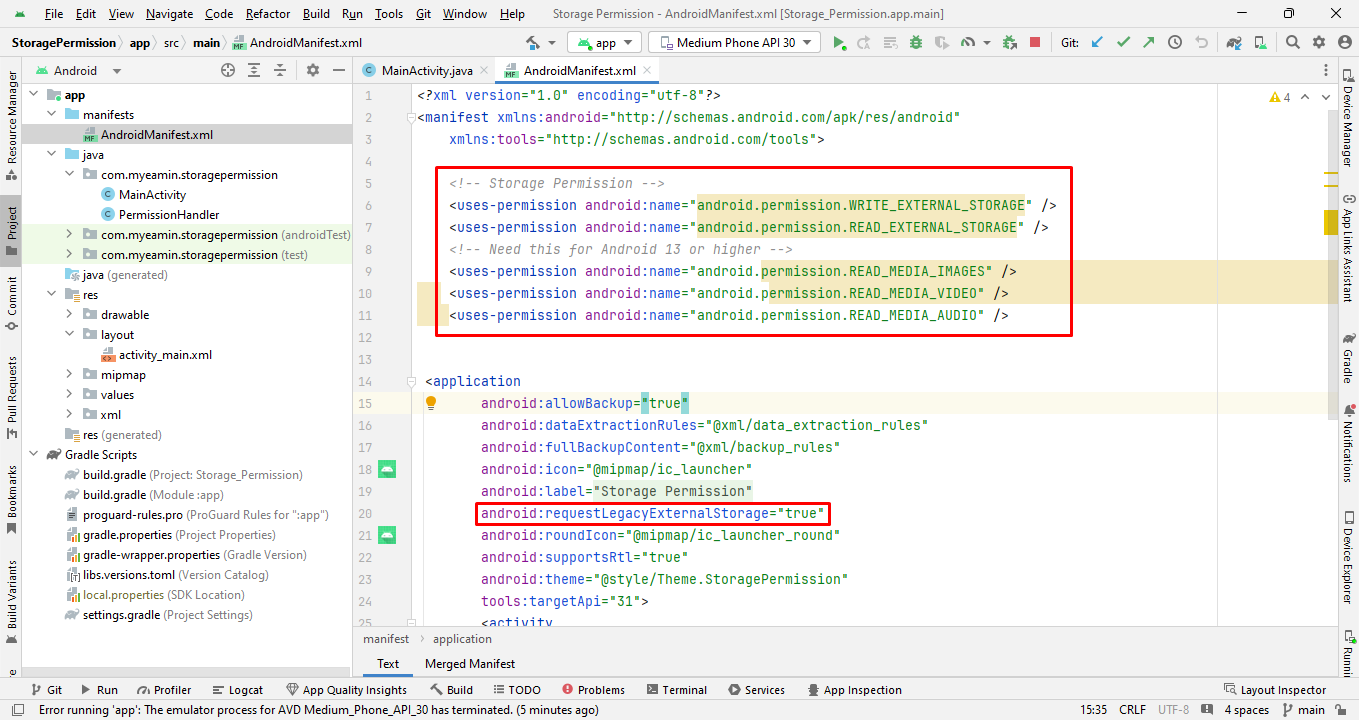
import android.Manifest;
import android.app.Activity;
import android.app.AlertDialog;
import android.content.DialogInterface;
import android.content.Intent;
import android.content.pm.PackageManager;
import android.net.Uri;
import android.os.Build;
import android.provider.Settings;

import androidx.core.app.ActivityCompat;
import androidx.core.content.ContextCompat;

public class PermissionHandler {

    private final Activity mActivity;
    private String[] permissions;

    // Constructor initializing the activity
    public PermissionHandler(Activity activity) {
        this.mActivity = activity;
    }

    // Method to check if storage permission is granted
    public boolean checkStoragePermission() {
        // Check if the device is running on Android 13 or higher
        if (Build.VERSION.SDK_INT >= Build.VERSION_CODES.TIRAMISU) {
            // Declare permissions
            permissions = new String[]{
                    Manifest.permission.READ_MEDIA_IMAGES,
                    Manifest.permission.READ_MEDIA_VIDEO,
                    Manifest.permission.READ_MEDIA_AUDIO
            };
            // Check permissions granted or not
            for (String permission : permissions) {
                if (ContextCompat.checkSelfPermission(mActivity, permission) != PackageManager.PERMISSION_GRANTED) {
                    return false;
                }
            }
            return true;
        }
        // For API 23 to Android 12
        else if (Build.VERSION.SDK_INT >= Build.VERSION_CODES.M) {
            // Declare permissions
            permissions = new String[]{
                    Manifest.permission.WRITE_EXTERNAL_STORAGE,
                    Manifest.permission.READ_EXTERNAL_STORAGE
            };
            // Check permissions granted or not
            for (String permission : permissions) {
                if (ContextCompat.checkSelfPermission(mActivity, permission) != PackageManager.PERMISSION_GRANTED) {
                    return false;
                }
            }
            return true;
        } else {
            // For SDK < 23
            return true; // Permission is automatically granted on SDK < 23 upon installation
        }
    }

    // Method to request permissions
    public void requestPermissions() {
        boolean shouldShowRationale = false;
        for (String permission : permissions) {
            if (ActivityCompat.shouldShowRequestPermissionRationale(mActivity, permission)) {
                shouldShowRationale = true;
                break;
            }
        }

        if (shouldShowRationale) {
            showRationaleDialog(permissions, 1);
        } else {
            ActivityCompat.requestPermissions(mActivity, permissions, 1);
        }
    }

    // Method for check shouldShowRequestPermissionRationale, otherwise redirects to app settings.
    public void showDialog(final String[] permissions, final int requestCode) {
        boolean shouldShowRationale = false;
        for (String permission : permissions) {
            if (ActivityCompat.shouldShowRequestPermissionRationale(mActivity, permission)) {
                shouldShowRationale = true;
                break;
            }
        }

        if (shouldShowRationale) {
            showRationaleDialog(permissions, requestCode);
        } else {
            goToSettings();
        }
    }

    // Method for show rationale dialog when permission denied
    private void showRationaleDialog(final String[] permissions, final int requestCode) {
        AlertDialog.Builder builder = new AlertDialog.Builder(mActivity);
        builder.setTitle("Permission Required")
                .setCancelable(false)
                .setMessage("This app needs storage permissions to function properly. Please grant all of them.")
                .setPositiveButton("OKAY", new DialogInterface.OnClickListener() {
                    @Override
                    public void onClick(DialogInterface dialog, int which) {
                        ActivityCompat.requestPermissions(mActivity, permissions, 1);
                    }
                })
                .setNegativeButton("NO THANKS", null)
                .show();
    }

    // Method for navigate to app settings
    private void goToSettings() {
        AlertDialog.Builder builder = new AlertDialog.Builder(mActivity);
        builder.setTitle("Permission Required")
                .setCancelable(false)
                .setMessage("Permission was denied and cannot be asked again. Please allow permission from app settings.")
                .setPositiveButton("GO TO SETTINGS", new DialogInterface.OnClickListener() {
                    public void onClick(DialogInterface dialog, int id) {
                        Intent intent = new Intent(Settings.ACTION_APPLICATION_DETAILS_SETTINGS,
                                Uri.fromParts("package", mActivity.getPackageName(), null));
                        intent.addFlags(Intent.FLAG_ACTIVITY_NEW_TASK);
                        mActivity.startActivity(intent);
                    }
                })
                .setNegativeButton("NO THANKS", null)
                .show();
    }
} // Check Storage Permission Granted or not
if (mPermissionHandler.checkStoragePermission()) {
// Show Toast when permission is granted
Toast.makeText(MainActivity.this, "Permission Granted", Toast.LENGTH_SHORT).show();
} else {
mPermissionHandler.requestPermissions();
} // Write this code where onCreate Bundle is end...
@Override
public void onRequestPermissionsResult(int requestCode, @NonNull String[] permissions, @NonNull int[] grantResults) {
super.onRequestPermissionsResult(requestCode, permissions, grantResults);
if (requestCode == 1 && permissions.length == grantResults.length) {
boolean allPermissionsGranted = true;
for (int result : grantResults) {
if (result != PackageManager.PERMISSION_GRANTED) {
allPermissionsGranted = false;
break;
}
}
if (!allPermissionsGranted) {
mPermissionHandler.showDialog(permissions, requestCode);
} else {
Toast.makeText(MainActivity.this, "Permission Granted", Toast.LENGTH_SHORT).show();
}
}
}MD YEAMIN - Android Software Developer (Learn With Yeamin)